Tools
Arch Linux
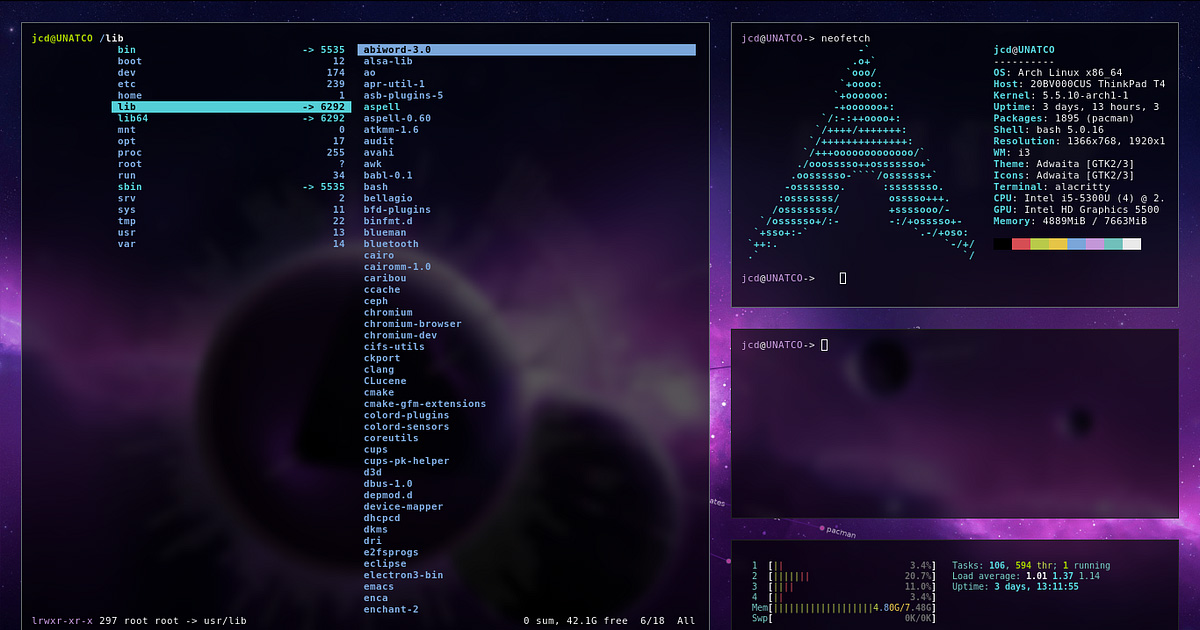
Arch Linux is a lightweight, flexible Linux distribution that you configure yourself. It gives you full control over what software runs on your system, which is both its strength and its learning curve.
Why it matters
Most operating systems, Windows, macOS, and even many Linux distributions, come with software pre-installed, services running by default, and data collection you may not be aware of. Arch Linux starts from nearly nothing, a base system with only what you explicitly install.
This means your system contains only the software you've chosen. There are no background processes, pre-installed trial software, or vendor partnerships built into the default installation. What runs on your machine is entirely the result of your decisions.
The privacy and security benefits are indirect, Arch gives you the tools and the foundation to build a hardened, minimal system, but whether your system is actually private and secure depends entirely on how you configure it.
What Arch Linux helps with
- A minimal base with no unnecessary software or services by default
- Full control over system services, you choose what starts at boot
- Access to a large software repository (official) and community-maintained packages (AUR)
- Transparent package management, pacman is direct, with no hidden background updates or automatic behaviour
- Strong community documentation via the Arch Wiki, one of the best Linux resources available
- Flexibility to implement security hardening at whatever level your needs require, firewalls, encrypted filesystems, AppArmor, DNS-over-HTTPS, VPN integration
What Arch Linux does not do
It does not configure security for you. Arch gives you the ability to build a secure system. It doesn't build one by default. A fresh Arch install has no firewall, no mandatory access controls, and defaults that prioritise functionality over hardening.
It does not protect against misconfiguration. Errors in security configuration, a firewall rule that doesn't apply, a service you forgot to disable, a package from the AUR you didn't inspect, leave real gaps. The control Arch provides includes the control to make mistakes.
It is not suitable as a first operating system for most people. Installation requires comfort with the command line, understanding of disk partitioning, manual bootloader configuration, and ongoing maintenance. The Arch documentation is excellent, but it assumes a baseline of familiarity.
AUR packages are not vetted by Arch maintainers. The Arch User Repository contains community-submitted packages. These are reviewed by other users but not by Arch's core team. Installing AUR packages requires reading the build scripts yourself to assess what they do.
Tradeoffs to be aware of
Arch uses a rolling release model, packages update continuously to the latest versions rather than using fixed release cycles. This means recent software but also occasional instability when updates require manual intervention. Arch news should be monitored before major updates.
Configuration is your responsibility. This is the cost of control. When something breaks, you diagnose and fix it. This is a meaningful time commitment that many people are not willing to make.
Arch is not hardened out of the box. Building a genuinely secure Arch system requires deliberate configuration, encrypted disk, user account setup (no root login), firewall rules, service minimisation, and more. The Arch Wiki has guidance on all of this, but you have to apply it.
Practical guidance
If you're new to Linux, start with a more user-friendly distribution (Ubuntu, Fedora, or Linux Mint) before attempting Arch. The skills transfer; the immediate experience is less frustrating.
If you're comfortable with Linux and want the control Arch provides, follow the official installation guide at wiki.archlinux.org/title/Installation_guide.
After installation, the first steps from a privacy standpoint, create a non-root user, configure sudo, set up a firewall (ufw is the simplest option), enable full-disk encryption (set up during installation with dm-crypt/LUKS), and disable any services you don't need.
Read PKGBUILD files before installing AUR packages. The PKGBUILD is the script that builds the package. Reading it tells you what it downloads, what it installs, and what it runs.
Keep the system updated, but read Arch news first (archlinux.org/news). Some updates require manual steps that pacman won't do automatically.
Going deeper
Why a minimal base matters. Every service running on your system is a potential attack surface. A web server with a vulnerability it doesn't need to be running is a risk. Arch's minimal defaults mean you don't have services running that you didn't consciously install. You can audit what's present because you installed everything yourself.
The Arch Wiki. The Arch Wiki is arguably the best Linux documentation resource available. Comprehensive articles on networking, encryption, security hardening, package management, and system administration make it a reference useful beyond Arch itself. If you're configuring any Linux system for privacy or security, the Arch Wiki is worth consulting regardless of which distribution you use.
dm-crypt/LUKS. Full-disk encryption on Arch is done with LUKS (Linux Unified Key Setup) layered over dm-crypt. When configured during installation, the entire disk is encrypted. At boot, the system prompts for a passphrase before decrypting the system. This protects against someone who gets physical access to your device.
DNS privacy options. Arch supports systemd-resolved with DNS-over-TLS, or alternatives like dnscrypt-proxy for encrypted DNS queries. The Arch Wiki covers both options. This is a meaningful improvement over sending DNS queries unencrypted to your ISP's resolver.

Foldy tip
Arch will test your patience. That is also how it teaches you.
Related pages
 Tails, a Linux-based OS configured for anonymity and amnesia, not customisation
 Qubes OS, a security-focused OS with compartmentalisation rather than minimalism as the approach
 GrapheneOS, similar philosophy on mobile, control, hardening, and minimal trust in third parties
 Threat modeling, helps clarify whether OS-level control is relevant to your situation