Tools
Self-Hosting Nextcloud Puts Your Files Back Under Your Control
Nextcloud is open-source software you run on your own server. Your files stay on hardware you control, and no third party has access to them by default.
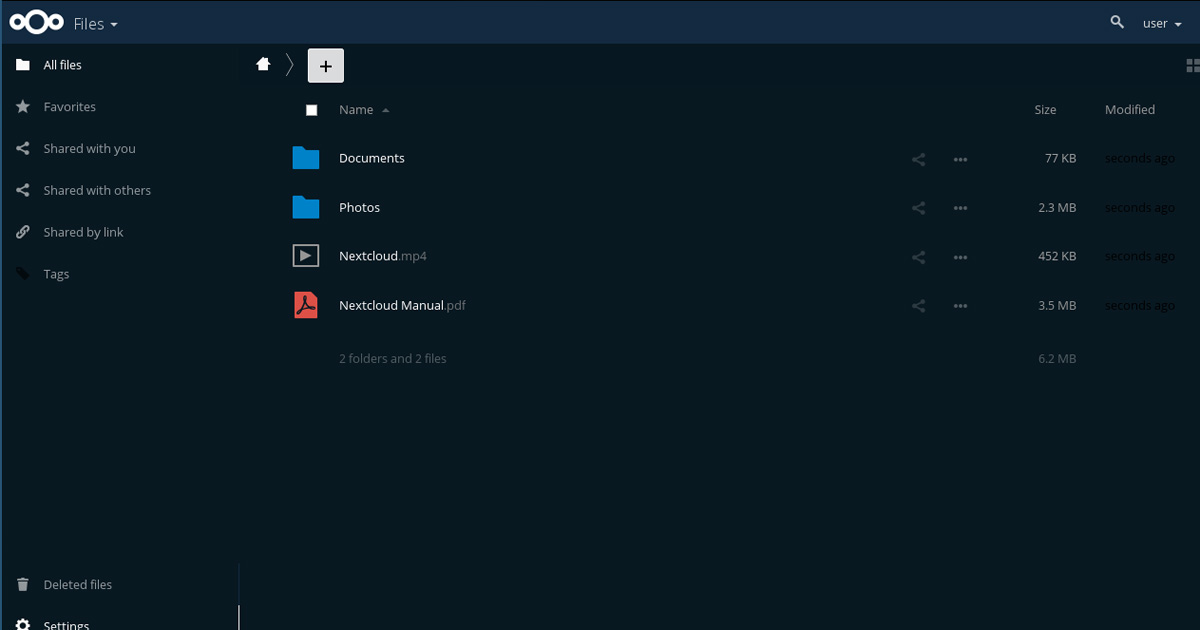
Nextcloud runs on anything from a Raspberry Pi to a dedicated server. The hardware is yours; the data stays on it.
Nextcloud is open-source software that you install on a computer or server you control. Once it's running, it works like a personal version of Google Drive or Dropbox, file sync, sharing, calendar, contacts, notes, but the data lives on your hardware, not on someone else's servers.
The practical difference is that no third-party company has access to your files by default. Google, Dropbox, and similar services have access to files stored on their infrastructure. With Nextcloud, the only entity with access is whoever has access to the hardware it's running on, in most home setups, that's you.
What Nextcloud actually is
Nextcloud is software, not a service. You don't pay a subscription to a company. You install it on hardware you provide, a home server, an old laptop, a Raspberry Pi, a virtual private server, and you're responsible for keeping it running and updated.
The software itself is free and open source. The Nextcloud organisation also offers managed hosting plans for people who want the software benefits without the maintenance responsibility, but the self-hosted version costs nothing beyond your hardware and internet connection.
It has a web interface, desktop sync clients for Windows, Mac, and Linux, and mobile apps for Android and iOS. From a user's perspective, it behaves similarly to the services it replaces. Files sync across devices, share links work, and you can access everything from a browser when you're away from home.
What self-hosting changes about your privacy
When your files are on Google Drive, Google can access them. Their terms of service reserve rights to scan content for policy violations, and legal processes can compel them to produce files. These aren't hypothetical concerns, they're how cloud storage works.
When your files are on a Nextcloud instance you run, no cloud company can access them. The risk profile shifts. Instead of trusting a large company's security and legal posture, you're trusting your own setup, which means your security depends on how well you've configured and maintained it.
Self-hosting doesn't automatically make your data more secure. A poorly configured Nextcloud instance exposed to the internet is more vulnerable than a well-maintained managed service. The benefit is control and the removal of third-party access, not a guarantee of better security.
What it takes to run it
At minimum, you need a computer that can run continuously, a stable internet connection, a domain name or dynamic DNS service if you want to access it from outside your home network, and some comfort with basic server administration.
The installation process has improved considerably. Nextcloud offers a straightforward installer, and distributions like Nextcloud AIO (All-in-One) reduce the configuration required. On a Raspberry Pi 4 with a good SD card or attached storage, it runs reliably for personal use.
The ongoing maintenance is the real commitment. You'll need to apply updates, monitor storage, and deal with occasional issues. This is the part that makes self-hosting not right for everyone, it's a small but real ongoing responsibility.
Who it makes sense for
Self-hosting Nextcloud is a good fit for people who have some technical comfort, want meaningful control over their file storage, and are willing to spend occasional time maintaining a server. It's particularly practical for people who already run a home server or are interested in learning server administration.
It's less suited for people who want cloud storage that just works without any maintenance, people whose threat model doesn't particularly include cloud provider access, or people without a reliable place to host hardware.
There's also a middle path. Some people use Nextcloud hosted on a virtual private server (VPS) they rent from a provider like Hetzner or Vultr. This removes the hardware responsibility while still keeping the files away from the large cloud companies. You're trusting a smaller, less data-hungry provider rather than a platform built on advertising or data mining.
Encryption considerations
Nextcloud supports server-side encryption, which encrypts your files on the server's disk. This protects against someone physically accessing your storage without knowing the encryption key. It does not protect against the server itself being compromised, because the key is available to the running software.
For stronger protection, encrypting files before they reach Nextcloud, using a tool like Cryptomator, which encrypts files locally before sync, ensures that even if someone accesses your Nextcloud instance, they get encrypted data they can't read. This adds friction but significantly raises the bar.
For most personal use cases, server-side encryption plus a well-secured instance is a reasonable starting point.
Suggested next step
If you have an old computer or a Raspberry Pi sitting unused, look at the Nextcloud installation documentation at nextcloud.com/install to understand what setup involves before deciding.
Foldy tip
Self-hosting is a spectrum. A basic Nextcloud setup on a spare machine is a reasonable starting point, not a commitment to becoming a sysadmin.